Build game UI
Add a Weeoui interface to a game with gameUi, or draw a custom interface with
draw and route its input through uiEvent.
Add a UI hook
Start with a game or plugin registered with Eggy. Eggy supplies the Weeoui context, font atlas, input routing, and renderer. Keep durable UI state in plugin fields, without pointers to the plugin itself:
pub const Game = struct {
    clicks: u32 = 0,

    pub fn gameUi(self: *Game, app: *eggy.App, ui: *eggy.ui.Context) !void {
        _ = app;
        ui.theme = eggy.ui.Theme.dark;
        ui.theme.text_size = 18;
        ui.heading(2, "My game");
        if (ui.button("Count")) self.clicks += 1;
        ui.label("Clicked {d} times", .{self.clicks});
    }
};
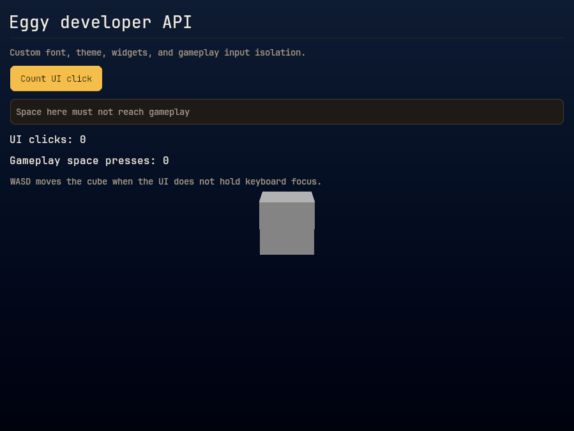
Use Weeoui's containers, custom widgets, and layout builder to change the layout and style. UI hooks run in plugin order. The interface is drawn after the scene and custom draw hooks, before Eggy presents the frame.
The same hook runs in the editor's Play Scene viewport, including while paused. It uses viewport-local logical coordinates and the target window's pixel scale. It does not draw over editor chrome or run while the editor's Build window freezes the game. Stop/reload discards the old UI contexts before unloading the game library.
Load a font once
Select a font once during initialization:
pub fn init(gpa: std.mem.Allocator, app: *eggy.App) !Game {
    const bytes = try app.resources().read(
        gpa,
        eggy.AssetRef(.any).init("resources/fonts/my-font.ttf"),
    );
    defer gpa.free(bytes);
    try (try app.gameUi()).setFont(bytes);
    return .{};
}
setFont copies the TTF/OTF, so the resource bytes can be freed immediately. It replaces GPU
resources safely; do not call it every frame. Customize ui.theme in the hook rather than
replacing ui.font or changing the context's ownership fields.
Contexts, widget trees, vertices, and draw targets are borrowed. Do not retain them beyond the hook/frame. Clipboard and text-input ownership follow UI focus. Standalone UI uses the existing SDL accessibility adapter; embedded game widgets are not yet merged into the editor's accessibility tree.
Use your own renderer
Omit gameUi and declare draw. A custom-renderer-only game creates no default Weeoui
overlay. For example, this minimal custom draw hook clears the target:
pub fn draw(self: *Game, app: *eggy.App, target: eggy.DrawContext) !void {
    _ = self;
    _ = app;
    try target.cmd.beginRenderPass(.{
        .color_attachments = &.{.{
            .view = target.target,
            .load_op = .clear,
            .store_op = .store,
            .clear_value = .{ .r = 0.1, .g = 0.2, .b = 0.4, .a = 1 },
        }},
    });
    target.cmd.endRenderPass();
}
For a custom interface, own your pipelines and buffers and record its commands here.
target.beginPass()/endPass() are convenient when preserving the scene instead of clearing
it. Enter and leave the hook outside a render pass, with the target in color-attachment
state. Pair a started pass with defer target.endPass() if later work can fail.
viewport is logical size, extent_px is physical size, and color_format matches the
target. frame_owner and frame_slot identify the already-waited reusable slot: keep
per-surface/per-slot upload buffers when rendering into more than one surface. Do not
submit, present, retain the command buffer, or destroy resources still used by the GPU.
Route custom UI input
To handle your renderer's input, declare:
pub fn uiEvent(self: *Game, app: *eggy.App, event: eggy.Event) !bool {
    _ = self;
    _ = app;
    return switch (event) {
        .mouse_button_down, .mouse_button_up => true,
        else => false,
    };
}
Return true for every event your custom UI owns, including releases. Default UI gets
first refusal, then custom uiEvent hooks run in reverse plugin order. Unconsumed input
reaches gameplay's event hook and app.input; consumed input reaches neither.
Default UI capture clears gameplay holds without inventing release actions. Call
app.input.cancel() when a custom modal interface takes focus. OS lifecycle events
are never swallowed. Click outside UI controls to return keyboard input to gameplay.
Editor shortcuts and modal tools retain precedence.
Check layout and input ownership
With the first example, click Count and check that the displayed number increases.
From an Eggy checkout, run zig build run-runtime -Dapi-demo=weeoui to display the
themed HUD with a copied custom font and a text field. Focus the field and press
Space: the gameplay counter must not increase. Click empty scene space, then use the
movement keys again: the cube must move and Space must reach gameplay.
Use -Dapi-demo=custom to run the custom-renderer-only example, which asserts
that no default overlay was created. Run zig build run -Dapi-demo=weeoui to open
its editor and inspect the API Tools panel and commands. Check your own interface
in the Play viewport, including while paused.
Related contracts
The hook reference lists signatures and call order. Input routing explains how UI ownership affects gameplay, and ownership and reload covers borrowed contexts and game-library lifetime.